Main view
Access CAU Explorer by clicking its icon on the Provisioning Portal’s top navigation bar.
CAU Explorer views
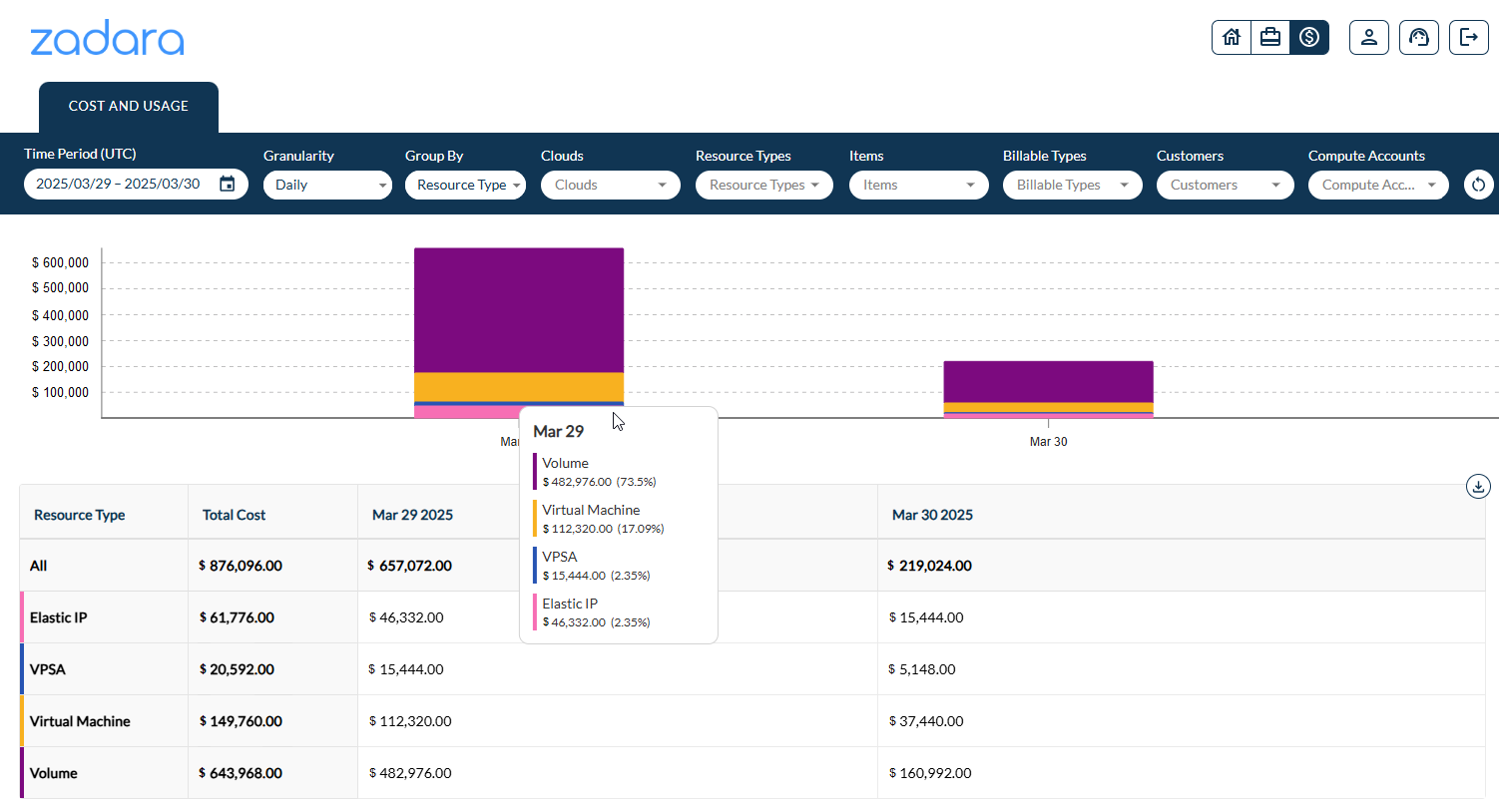
The CAU Explorer Main screen provides an overview of costs in a bar chart and table, with grouping and filtering.
Key functions
The CAU Explorer’s dashboard can focus from full consolidated cost information, drilling down to detailed scopes with filtering and grouping functions, and the ability to download the data in the view, and reset the view to default settings.
Filters and groupings
The main view filters bar provides filters and grouping options, to refine and narrow the scope of data in the view.
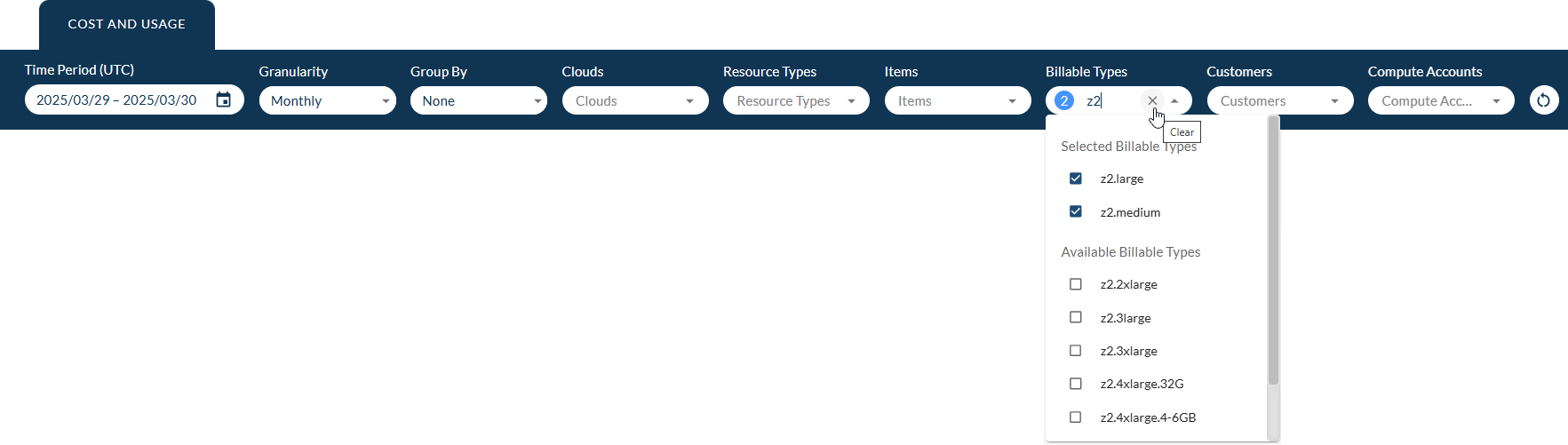
On the main view filters bar:
Unfiltered options remain in gray text.
Selected filters appear in black.
Time Period (UTC) shows the chosen date range.
Single-choice options (Granularity, Group By ) show the selected grouping.
Multiple-choice options show the count of selected values that the filter matches and displays.
Search for matching parameter values, by entering a case-insensitive string.
Hover over a multiple-choice filter to reveal the “x” button for clearing the selection.
You can determine the scope and summary group breakdowns, by applying your selection of the following filters and groupings:
Time Period (UTC)
The CAU Explorer dashboard allows the option to define a specific date range, or select a predefined date range.
The available predefined date range buttons vary, depending on the selected Granularity level (Daily or Monthly):
Date Range Button
Description
Granularity Level
Daily
Monthly
Last Week
Data from the same day of the week, one week ago, until now.
✓
Last Month
Data from the same day of the month, last month, until now.
✓
Last 3 Months
Data from the same day of month, three months ago, until now.
✓
✓
Last 6 Months (current default)
Data from the same day of month, six months ago, until now.
✓
✓
Last Year
Data from the same day of month, one year ago, until now.
✓
Last 3 Years
Data from the same day of month, three years ago, until now.
✓
Last 5 Years
Data from the same day of month, five years ago, until now.
✓
Default
The default date range.
✓
✓
Important
The data in the date range display is determined by cost and usage event dates aligned to the UTC time zone, and not by any specific site’s or cloud’s geographic location.
Granularity
Granularity determines the available predefined date range buttons for Time Period, and the summary totals level.
Select one of:
Monthly (default) totals, broken down to Group By element subtotals (if selected).
Daily totals, broken down to Group By elements subtotals (if selected).
Group By
View the table summary totals, broken down according to a selected grouping:
None (default):
Displays a total per Granularity unit (month or day) for the defined date range and other filters, and a grand total for all.
Resource Type:
Displays a total per selected Resource Type for each Granularity unit (month or day) for the defined date range and other filters, a summary total per Resource Type and a grand total for all.
Cloud
Displays a total per selected Cloud for each Granularity unit (month or day) for the defined date range and other filters, a summary total per Resource Type and a grand total for all.
Clouds
A cloud refers to a specific deployment of Zadara’s infrastructure services, such as compute, storage, and networking, at a specified physical or virtual location.
Each Zadara cloud is uniquely identified and managed as an independent service region or zone.
You can select or deselect clouds from the account’s clouds list, to control the scope of billing data displayed.
By default, billing data from all clouds in the account is presented in the view.
Resource types
From the list of billed resource types, there’s the option to select or deselect resource types, such as Elastic IP, Virtual Machine, Volume and VPSA, from the scope of the presented billing information.
By default, billing data from all resource types is presented in the view.
Items
An item is an instance of a resource type component associated with a cloud, for example, an HDD or SDD of a specified capacity, a VPSA Engine, a VM instance, and so on.
From a list of items, there’s the option to select or deselect Items such as specific instances of resource types, from the scope of the presented billing information.
By default, billing data from all items is presented in the view.
Billable types
From a list of billable types, there’s the option to select or deselect billable types, such as data reduction services, VPSA engine and disk types, and compute instance types, from the scope of the presented billing information.
By default, billing data from all billable types is presented in the view.
Customers
A customer is a user’s Provisioning Portal username.
From a list of customers, there’s the option to select or deselect customers from the scope of the presented billing information.
By default, billing data from all customers is presented in the view.
Compute Accounts
A compute account is a tenant-scoped identity and container, used to isolate and manage virtualized compute resources within a Zadara cloud environment.
From a list of compute accounts, there’s the option to select or deselect compute accounts from the scope of the presented billing information.
By default, billing data from all compute accounts is presented in the view.
Reset to Default
The Reset to Default button is on the right of the filter and grouping selection options bar.
Click Reset to Default to remove the custom period, granularity, grouping and filter selections, and restore the default view.
Estimation
Downloads
Download main view to CSV (Explorer UI)
The main view Download CSV button is located at the top right.
Click Download CSV to export the current displayed data, and save it
as a file in .csv format. The scope of the saved data is according to
the selected time period, granularity, grouping and filters.
The saved .csv file has the same structure and values as the table in
the lower section of the CAU Explorer.
Download main view to JSON (CLI)
From the command line, you can use the Provisioning Portal’s GET Organizations API to download CAU Explorer data, and optionally apply a custom time period, granularity, grouping and filters.
See the Zadara Provisioning Portal API documentation’s Overview section for information about the Endpoint base URL and retrieving an Authentication token.
Usage:
curl -X 'GET' \
'<Zadara Provisioning Portal URL>/api/v2/organizations/<Organization UUID>/cost_explorer.json \
-H 'accept: application/json' \
-H 'X-Token: <token>'
You can optionally extend the URL with a query that applies a custom time period, granularity, grouping and filters.
For example, applying the following filters:
Granularity as monthly:
?granularity=monthlyTime period from 2024-03-01 to 2024-06-30 in
yyyy-mm-ddformat:&from=2024%2F03%2F01&to=2024%2F06%2F30Group By cloud:
&group_by=cloud
Extending the URL to apply the above filters:
curl -X 'GET' \
'https://manage.zadarastorage.com/api/v2/organizations/1a2b..36.char.UUID.string..x9z/cost_explorer.json?granularity=monthly&from=2024%2F03%2F01&to=2024%2F06%2F30&group_by=cloud \
-H 'accept: application/json' \
-H 'X-Token: A1b2..token.string..yz'
The request above returns data in a JSON structure similar to the following response:
{
    "data": {
        "2024-03-31": {
        "total": 14508.00,
        "cloud-01": 899.00,
        "cloud-02": 1457.00,
        "cloud-03": 1209.00,
        "cloud-04": 1674.00,
        "cloud-05": 1209.00,
        "cloud-06": 1395.00,
        "cloud-07": 1519.00,
        "cloud-08": 1426.00,
        "cloud-09": 1860.00,
        "cloud-10": 1860.00
        },
        "2024-04-30": {
        "total": 14040.00,
        "cloud-01": 870.00,
        "cloud-02": 1410.00,
        "cloud-03": 1170.00,
        "cloud-04": 1620.00,
        "cloud-05": 1170.00,
        "cloud-06": 1350.00,
        "cloud-07": 1470.00,
        "cloud-08": 1380.00,
        "cloud-09": 1800.00,
        "cloud-10": 1800.00
        },
        "2024-05-31": {
        "total": 14508.00,
        "cloud-01": 899.00,
        "cloud-02": 1457.00,
        "cloud-03": 1209.00,
        "cloud-04": 1674.00,
        "cloud-05": 1209.00,
        "cloud-06": 1395.00,
        "cloud-07": 1519.00,
        "cloud-08": 1426.00,
        "cloud-09": 1860.00,
        "cloud-10": 1860.00
        },
        "2024-06-30": {
        "total": 14040.00,
        "cloud-01": 870.00,
        "cloud-02": 1410.00,
        "cloud-03": 1170.00,
        "cloud-04": 1620.00,
        "cloud-05": 1170.00,
        "cloud-06": 1350.00,
        "cloud-07": 1470.00,
        "cloud-08": 1380.00,
        "cloud-09": 1800.00,
        "cloud-10": 1800.00
        }
    },
    "totals": {
        "cloud-01": 3538.00,
        "cloud-02": 5734.00,
        "cloud-03": 4758.00,
        "cloud-04": 6588.00,
        "cloud-05": 4758.00,
        "cloud-06": 5490.00,
        "cloud-07": 5978.00,
        "cloud-08": 5612.00,
        "cloud-09": 7320.00,
        "cloud-10": 7320.00,
        "total": 57096.00
    },
    "currency": "USD"
}