Backup to Object Storage (B2OS)
zCompute Backup to Object Storage (B2OS) extends backup and restore capabilities beyond local block storage. It enables backing up and restoring VMs and volumes that are protected by protection-group to and from Zadara Object Storage systems.
These Zadara Object Storage systems can also reside in different physical locations than the source zCompute cloud, allowing recovery to any zCompute cloud in the event of a site-level failure.
On top of this capability, from zCompute v24.03, Protection Groups also provide VM-level crash-consistent backups. Backup snapshots are taken as an atomic operation on all volumes of a protected VM, treating the VM’s volumes as a consistency group.
zCompute B2OS is an integral feature of zCompute. It provides full backup and restore functionality without requiring third-party software or installing software agents on protected VMs.
Protection groups are backup policies that define the backup schedule for protected VMs and volumes, including the backup interval and retention period.
With the introduction of B2OS, you can optionally configure protection groups to back up protected VMs and volumes to Zadara Object Storage.
The following diagram depicts an example scenario of zCompute’s B2OS any-to-any backup and restore capability:
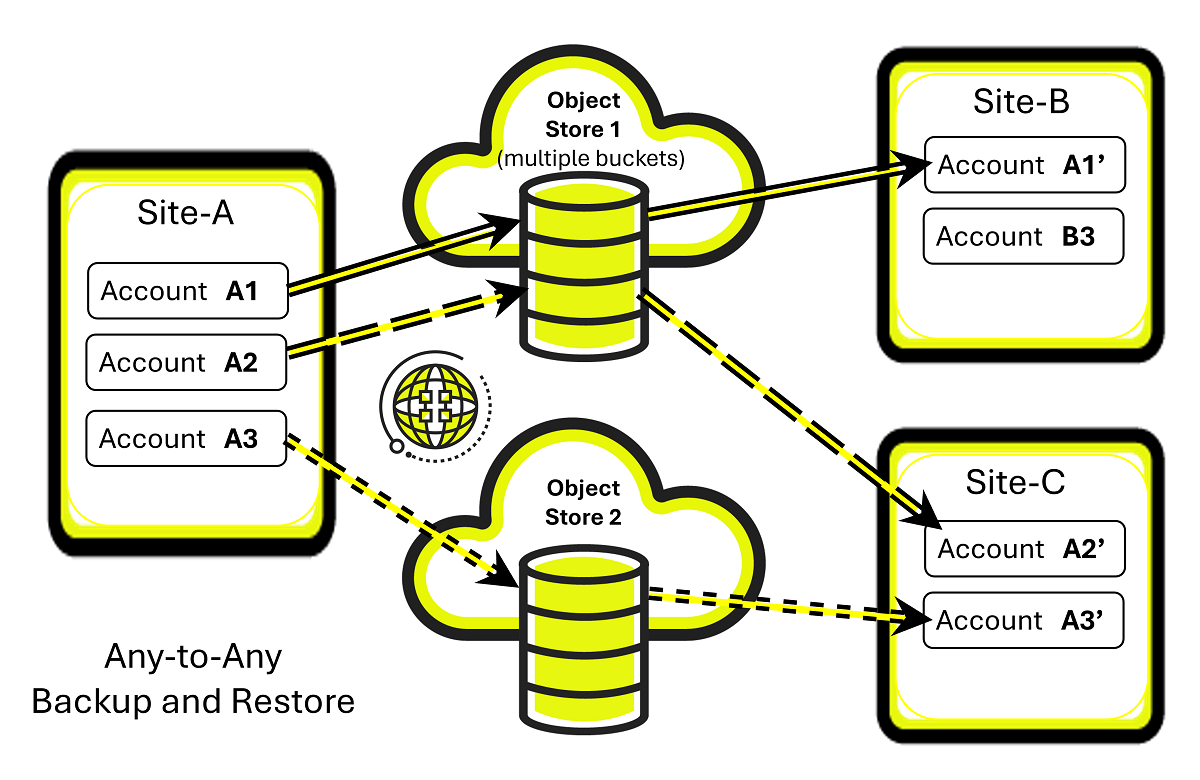
In this example, Site-A is a site that has several zCompute accounts. Each account has one or multiple Data Protection using Protection Groups. Snapshots of a Protection Group’s VM instances and volumes are taken according to schedules and stored locally.
Individual, multiple or all of an account’s Protection Groups local snapshots can also be scheduled for backup to an Object Storage.
Each Protection Group has an exclusive Object Storage bucket or container, used solely for that Protection Group’s snapshots.
An account’s backups can be restored from the Object Storage back to the original account or to other sites, maintaining full data integrity and crash-consistency.
In the example in the diagram above, Site-A’s selected accounts’ Protection Groups are restored to Site-B and Site-C. Each Protection Group’s VM instances and volumes are restored as an integral unit from a snapshot in the Protection Group’s dedicated Object Storage container.
Backup to Object Storage (B2OS) Configuration Flow
The zCompute Backup to Object Storage (B2OS) configuration high-level flow:
Create an External Endpoint to the Object Storage.
Create a Backup Protection Group:
Verify that Protection Group’s Backup to Object Storage is enabled.
Add VMs and volumes to a Backup Protection Group.
See Adding or Removing Protected Resources.
Snapshots of the Protected Resources of the Backup Protection Group occur according to the configured schedule.
Optionally, take an initial immediate snapshot with Backup Protection Group Trigger Now.
Caution
Any manual change to the Object Storage container or to its contents, including deletions, can cause severe malfunctions.
Deletion of a Protection Group’s protected data should be accomplished by either changing the retention period or deleting the Protection Group. It can take a while until deletion of the Protection Group’s containers and their contents completes. After that, the external endpoint pointing to the container can also be deleted.
If in doubt, please contact Support for guidance.
Remote Snapshots
Tenant administrators can configure External Endpoints for the purpose of saving snapshots to remote Object Storage destinations.
Tenant administrators can use Data Protection using Protection Groups to configure sets of protected resources comprising volumes and VM instances for scheduled backups at the same specified periodic intervals for all members of a group. They can also trigger additional immediate backups of a group.
External Endpoints
Viewing External Endpoints
Navigate to Configuration > External Endpoints.
A list of configured External Endpoints displays.
Click an External Endpoint to display its details.
The External Endpoint’s details display in the lower pane.
Creating an External Endpoint
Note
At the cloud level, accessing an Object Storage container via an External Endpoint requires the combination of the container name and the Object Storage user’s Access Key to be unique within the cloud.
To create more than one External Endpoint for the same Object Storage container within a cloud, you must configure the additional External Endpoint with the Access Key and Secret of a different user in the Object Storage.
A separate external B2OS endpoint must be defined for each backup protection group, forming a one-to-one mapping.
Backup protection groups are project-scoped. Each protection group belongs to a single project and protects only the VMs and volumes within that project.
Before creating an External Endpoint, consult with your MSP regarding configuration values, in particular, Network Topology and Endpoint URL.
Navigate to Configuration > External Endpoints.
A list of configured External Endpoints displays.
In the top menu bar, click + Create.
In the Create External Endpoint dialog, enter the External Endpoint’s parameters:
Name: A unique meaningful name for the External Endpoint.
Description: Optional description.
Endpoint Type: From the dropdown, select B2OS.
Currently, B2OS only supports Zadara Object Storage (NGOS).
Caution
To create a new External Endpoint for the purpose of Backup to Object Store, the target Zadara Object Store container must already exist and must be empty.
Any object in the container, including empty folders, will cause the creation of a B2OS endpoint to fail.
Provide the following details from the Zadara Object Storage’s User Information and Console screens.
Network Topology: Based on input from your MSP, select the topology:
Frontend Network
Outbound Network
Region: Copy the User Information > Authentication > Region.
Endpoint URL:
Typically, copy the User Information > Connectivity - Public Network > Public API Endpoint.
Consult and verify this with your MSP, as this endpoint value can depend on your Network Topology.
Important
The configuration requires a URL beginning with
https://.Prefix the B2OS Endpoint URL string with
https://, if it is missing in the URL copied from the Zadara Object Storage’s Public API Endpoint configuration.For example:
If Zadara Object Storage’s Public API Endpoint isabc00000123-public-zadara.zadarazios.comthen the B2OS Endpoint URL ishttps://abc00000123-public-zadara.zadarazios.comBucket: Enter the Container name as it appears in the Console screen.
Access Key: Copy the User Information > Authentication > S3 Access Key.
Secret: Copy the User Information > Authentication > S3 Secret Key.
Verify SSL: Toggle switch to enable or disable checking whether the SSL certificate is valid.
Caution
Any manual change to the Object Storage container or to its contents, including deletions, can cause severe malfunctions.
Deletion of a Protection Group’s protected data should be accomplished by either changing the retention period or deleting the Protection Group. It can take a while until deletion of the Protection Group’s containers and their contents completes. After that, the external endpoint pointing to the container can also be deleted.
If in doubt, please contact Support for guidance.
Modifying an External Endpoint
Navigate to Configuration > External Endpoints.
A list of configured External Endpoints displays.
Click an External Endpoint to display its details.
In the top menu bar, click Modify.
In the Modify External Endpoint dialog, the following fields can be updated:
Name: A unique meaningful name for the External Endpoint.
Description: Optional description.
Access Key: Object Storage user’s S3 Access Key
Secret: Object Storage user’s S3 Secret Key
Caution
Any manual change to the Object Storage container or to its contents, including deletions, can cause severe malfunctions.
Deletion of a Protection Group’s protected data should be accomplished by either changing the retention period or deleting the Protection Group. It can take a while until deletion of the Protection Group’s containers and their contents completes. After that, the external endpoint pointing to the container can also be deleted.
If in doubt, please contact Support for guidance.