Testing VM Connectivity
Connectivity to a specific VM instance can be tested by ping from DHCP server using either the GUI or CLI.
Test Connectivity with GUI
Navigate to the Compute > Instances view.
Select a specific instance and select More from the top menu.
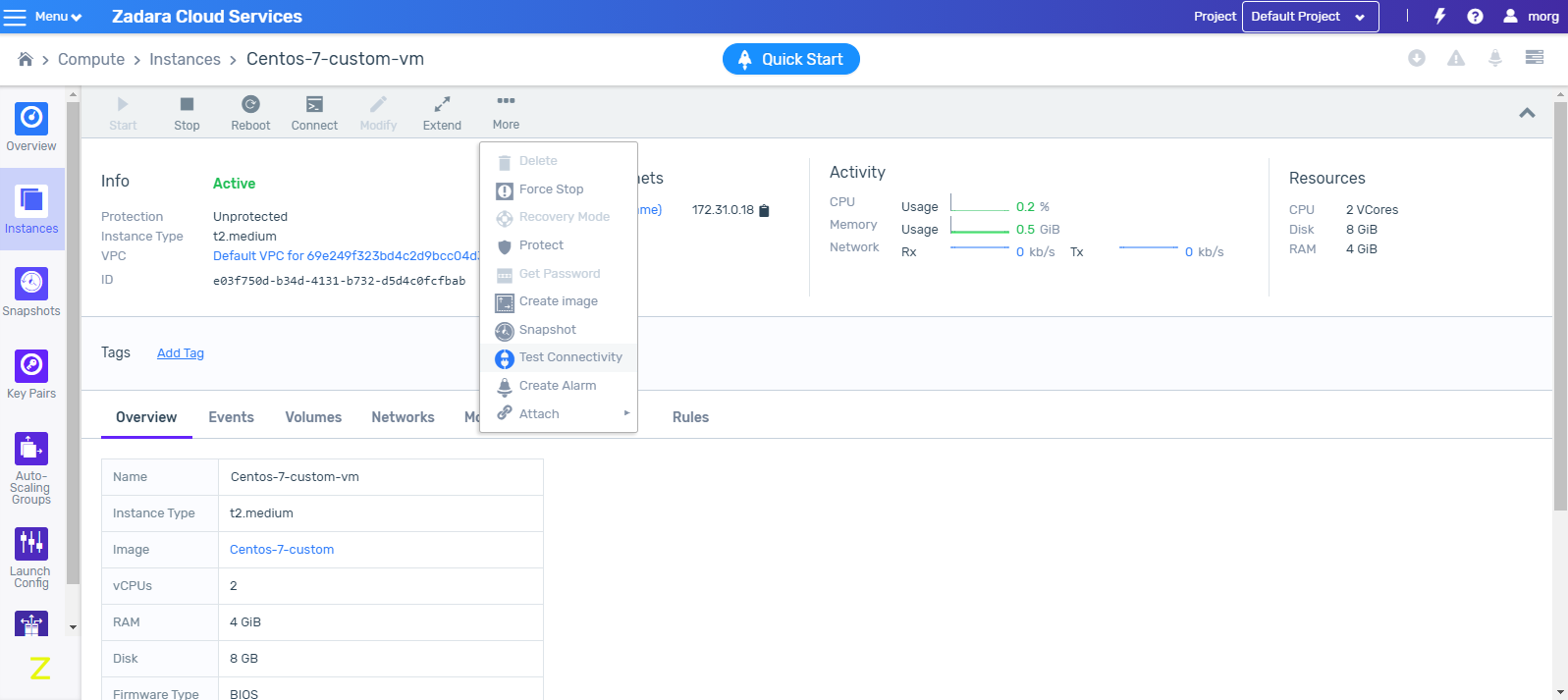
Select Test Connectivity. The Test Connectivity window is displayed.

Select either arping or ping for the connectivity test.
Note
Ping checks layer 3 connectivity and is blocked by security-group filtering, if traffic is not allowed from any IP in the subnet. Arping check layer 2 connectivity and bypasses security-group filtering.
Click OK. A message is displayed that the connectivity test is taking place.
A few seconds later, the test results will be displayed indicting success or failure as well as other relevant details. This status report is also available in the right-hand sidebar.
Test Connectivity with CLI
The ‘guestnet-admin-tool ping-vm create’ command which tests the VMs connectivity requires the ID of the given VM. Note: ‘–command-type’ is either ‘ping’ (default) or ‘arping’
guestnet-admin-tool ping-vm create [-h]
                                   [-f {adaptive_table,json,shell,table,value,yaml}]
                                   [-c COLUMN] [--max-width <integer>]
                                   [--noindent] [--prefix PREFIX]
                                   [-m [NAME=VALUE [NAME=VALUE ...]]]
                                   [--command-type COMMAND_TYPE]
                                   [--name NAME]
                                   vm_id
Run the ‘vm list’ command to locate the ID of VM-1.
vm list -c id -c nameThis returns a list of VMs and their IDs.
+--------------------------------------+-----------------------------------------------------+
| id                                   | name                                                |
+======================================+=====================================================+
| cfdb1753-f8e6-4d32-8ec8-e22d76fbc11e | VM-1                                                |
+--------------------------------------+-----------------------------------------------------+
Test connectivity for VM-1.
guestnet-admin-tool ping-vm create cfdb1753-f8e6-4d32-8ec8-e22d76fbc11eThis returns a temporary, pending status of the VM’s connectivity.
+--------------+--------------------------------------+
| id           | a8c3ee99-8966-4f7c-b127-6ce31c397b2d |
| name         | none                                 |
| status       | pending                              |
| command_type | ping                                 |
| created_at   | 2019-05-07T13:40:02.132361           |
| output       | -                                    |
| project_id   | bd616bd0a58f467cb0e96eeb5af6b53c     |
| updated_at   | 2019-05-07T13:40:02.132369           |
| user_id      | admin                                |
| vm_id        | cfdb1753-f8e6-4d32-8ec8-e22d76fbc11e |
+--------------+--------------------------------------+
Wait a few seconds and then request the final status of this VM connectivity test using the ‘guestnet-admin-tool ping-vm get ping_vm_id‘.
guestnet-admin-tool ping-vm get a8c3ee99-8966-4f7c-b127-6ce31c397b2dThis returns the final, succeeded/failed status of the VM connectivity test with relevant output details.
+--------------+----------------------------------------------------------------+
| id           | a8c3ee99-8966-4f7c-b127-6ce31c397b2d                           |
| name         | none                                                           |
| status       | succeeded                                                      |
| command_type | ping                                                           |
| created_at   | 2019-05-07T13:40:02                                            |
|              +----------------------------------------------------------------+
| output       | PING 10.11.12.10 (10.11.12.10) 56(84) bytes of data.           |
|              | 64 bytes from 10.11.12.10: icmp_seq=1 ttl=64 time=2.33 ms      |
|              | 64 bytes from 10.11.12.10: icmp_seq=2 ttl=64 time=0.369 ms     |
|              |                                                                |
|              | --- 10.11.12.10 ping statistics ---                            |
|              | 2 packets transmitted, 2 received, 0% packet loss, time 1001ms |
|              | rtt min/avg/max/mdev = 0.369/1.350/2.332/0.982 ms              |
|              |                                                                |
|              +----------------------------------------------------------------+
| project_id   | bd616bd0a58f467cb0e96eeb5af6b53c                               |
| updated_at   | 2019-05-07T13:40:04                                            |
| user_id      | admin                                                          |
| vm_id        | cfdb1753-f8e6-4d32-8ec8-e22d76fbc11e                           |
+--------------+----------------------------------------------------------------+
Note
This information is automatically deleted after approximately one hour.
Additional Commands for VM Connectivity Testing
Delete a specific VM connectivity test
guestnet-admin-tool ping-vm delete ping_vm_idList all VM connectivity tests for a specific VM
guestnet-admin-tool ping-vm list --vm-id VM_IDList all VM connectivity tests for all VMs
guestnet-admin-tool ping-vm list